
Invite-Only Grants and Applicant Invitations
By default anyone with the link can apply to your grant. Switch it to invite only and only people you have named can start an application.
You will find the setting in Grant Settings, General, and you can switch it back whenever you like.
What an invitation actually controls
Read this bit carefully, because it catches people out. An invitation controls one thing: whether someone can start an application. Everything either side of that moment is unaffected.
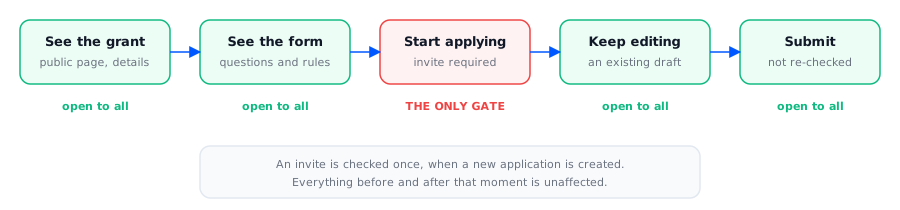
So a few consequences follow:
The grant and its questions stay publicly visible. Invite only is not a way to keep a programme's details confidential.
Someone without an invitation sees a note explaining that an invitation is required where the Apply button would be.
Revoking does not undo an application already started. That person keeps their draft and can still submit it. Revoking only stops them starting another one.
If you need to remove someone from a grant entirely, revoking the invitation is not enough on its own.
Sending invitations
Go to Grant Settings, Applicant Invites and paste in email addresses, up to 100 at a time. Anyone who does not already have an account gets one created for them.
Each new invitee receives the Invitation to apply email with a link into the applicant portal. You can reword that template under email templates like any other.
Sending again is safe. There is one invitation per person per grant, so a repeat send updates the existing one. People who have already applied are not emailed again, and anyone you previously revoked is reinstated.
Invitations from a connected system
If your organisation has connected another system to Optible, that system can send an invitation for you and set up the applicant's draft ahead of time. When the applicant first opens it, they land in that draft, the invitation is marked Accepted, and Optible offers to copy answers from a previous application if they have one. If the applicant already has a draft on the grant, the connected system is told so rather than creating a second one.
Reading the status column
Pending | Sent, not used yet. |
Accepted | Set automatically the first time they start an application. There is nothing for them to click. |
Revoked | Withdrawn by you. The record stays so the list still shows what happened. |
Invitations never expire. One sent today still works next year unless somebody revokes it.
Who can invite
Organisation admins and analysts, plus anyone made an admin on that particular grant. Assessors cannot.