
Criteria Ranking
The Criteria Ranking section provides a comprehensive overview of the application's performance against the criteria set by the grant program. It displays the assessor's ranking score, the average ranking score, and the user's own rank.
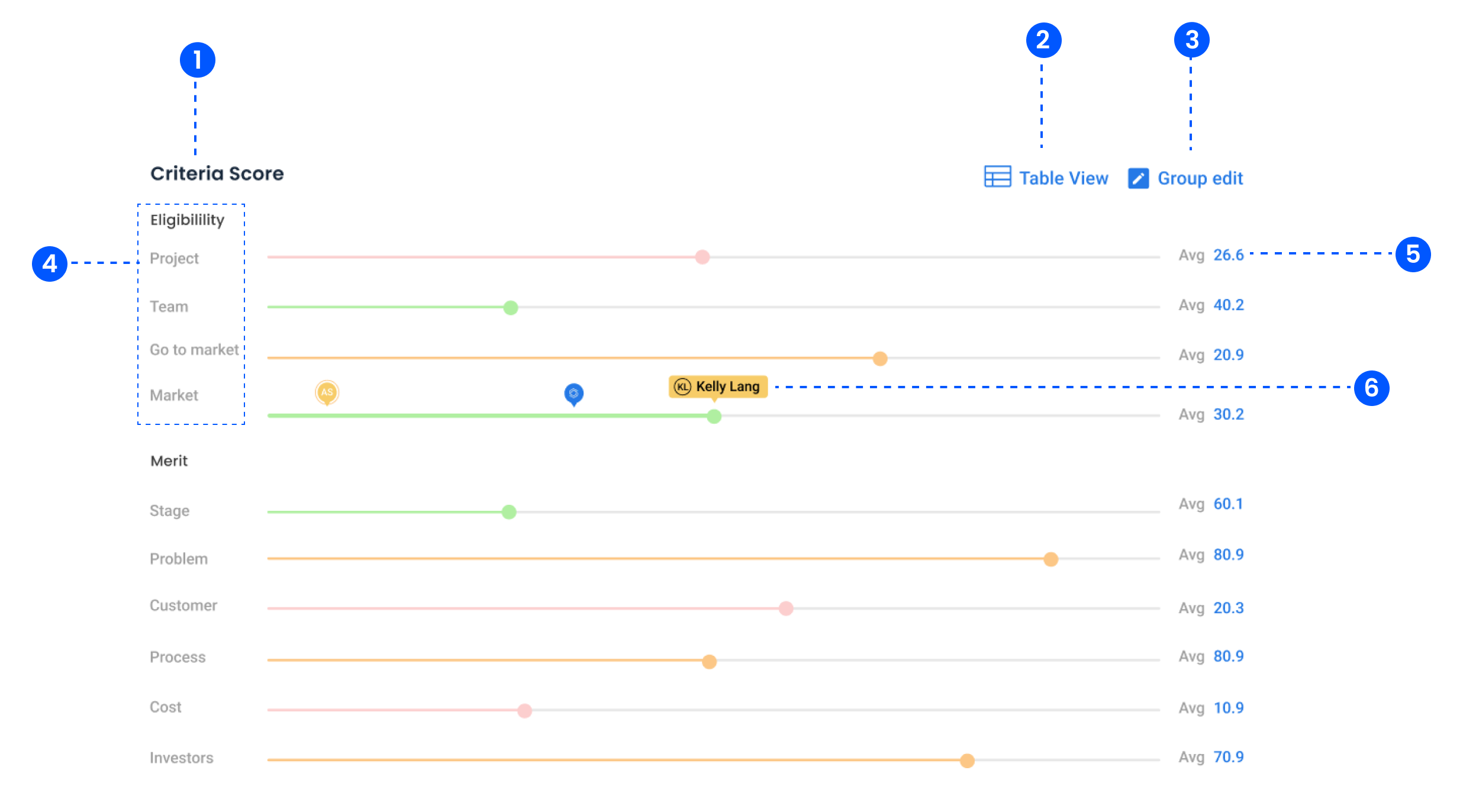
1. Criteria Score
Displays a list of categories and their respective subcategories with visual scoring bars.
2. Table View
Switches the display to a tabular format for data analysis.
3. Group Edit
Enables batch editing of scores or assessments across multiple criteria.
4. Subcategories and Metrics
Each subcategory is visualised as a horizontal line with markers indicating scores.
5. Average Score
Displays the average score for each subcategory for quick benchmarking.
6. Individual Assessment and Feedback
Visual markers identify specific assessor scores and contributions.
7. Source Badges
Under each criteria group's reasoning is a small badge carrying a count of sources. Hover it to list the passages Optible drew on, or click to jump straight to one.
Selecting a source highlights the exact words quoted in the answers panel, so you can check a score without leaving the assessment.
See Seeing the Evidence Behind an Optible Score for how to read the badges and what an unverified source means.
If the badges are not showing, check the application's status: a status set to hide the Optible score hides the reasoning and its sources too.