
Summary - Header
The Application Details Header provides a concise yet comprehensive overview of key user and project information. It combines identification details, interactive tools, and project status for efficient management.
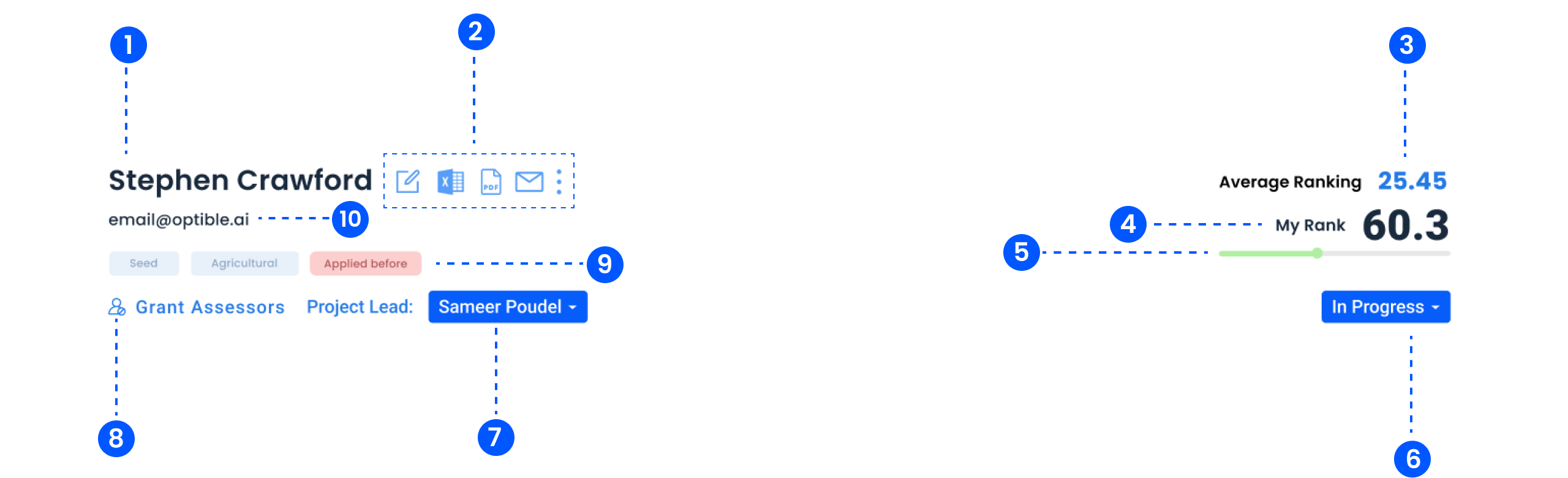
1. Application Title
Displays the title of the application as a primary identifier.
2. Action Buttons
- Edit, View Documents, Send Email, Download PDF
3. Average Ranking
Displays the average ranking score given by assessors.
4. My Rank
Highlights the user's own rank compared to the average.
5. Progress Status
Shows the current status of the application (e.g. In Progress, Completed).
6. Project Lead
Displays the Project Lead with a dropdown to reassign.
7. Grant Assessors
Lists the grant assessors assigned to the application.
8. Application Tags
Categorises the application with relevant tags for quick identification.
9. Who Else Is Here
A row of avatars shows which colleagues currently have this application open, with a badge when someone is ranking or editing a recommendation or observation.
It is a heads-up, not a lock. Nothing stops two people editing the same field, so it is worth a message before you both start.
See Seeing Who Else Is on an Application.
10. Box Sync
On grants connected to Box, the header shows when the folder last synced and when the next sync is due.
Pull fetches the latest files from that application's Box folder straight away, rather than waiting for the schedule. It only appears while the Box connection is active.
See Working with Box.
If the ranking is missing
Average Ranking and My Rank can be hidden entirely. A status set to hide the Optible score removes it, and the assessment reasoning with it, for assessors on that status. Admins and analysts still see everything.